Line weight is how heavy or light a drawn line looks, usually because of its thickness. An artist can keep thickness consistent, vary it from mark to mark, or change it along a single stroke. The studies below isolate width first, then separate width from the path a line follows.
In a comic panel, the outline of a jacket, a crease in its sleeve, and a building across the street do not need equal emphasis. Changing their line weights is one way to tell them apart. Ask which edge the reader should notice, and why.
The same form, different emphasis
Look at the two cylinders below. Their centerline paths and proportions are identical. In the first, every contour has the same width. In the second, some edges are thinner and others thicker.
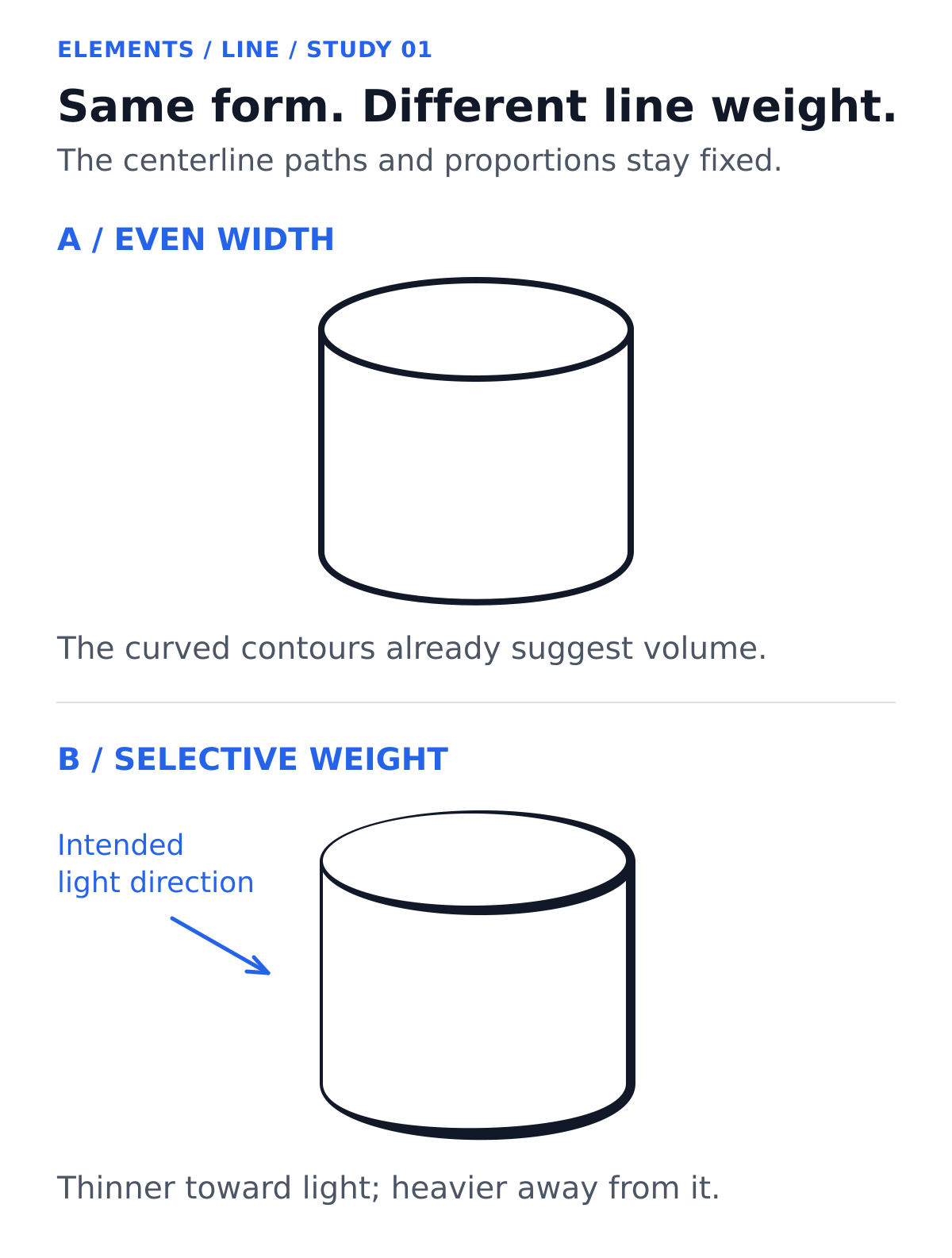
Curved contours alone already suggest a three-dimensional form. In the second drawing, the heavier right and lower edges change which edges stand out without changing the geometry.
Keep this in mind when you ink a figure. A thicker outline can separate a silhouette from interior detail, but line weight does not replace a readable pose or well-built forms. For the broader vocabulary of contours, cross-contours, and hatching, see the Line lesson.
Clarify an overlap
When an arm crosses a torso, the arm’s outline stays unbroken where it covers the torso, and the torso’s outline stops at the arm’s edge. That break is a clue to which form is in front.
Compare the two band drawings. Both already show the horizontal band in front: its outline continues, while the vertical band’s outline stops where the horizontal band covers it. The second adds short, heavier accents to the front contour near the intersections.
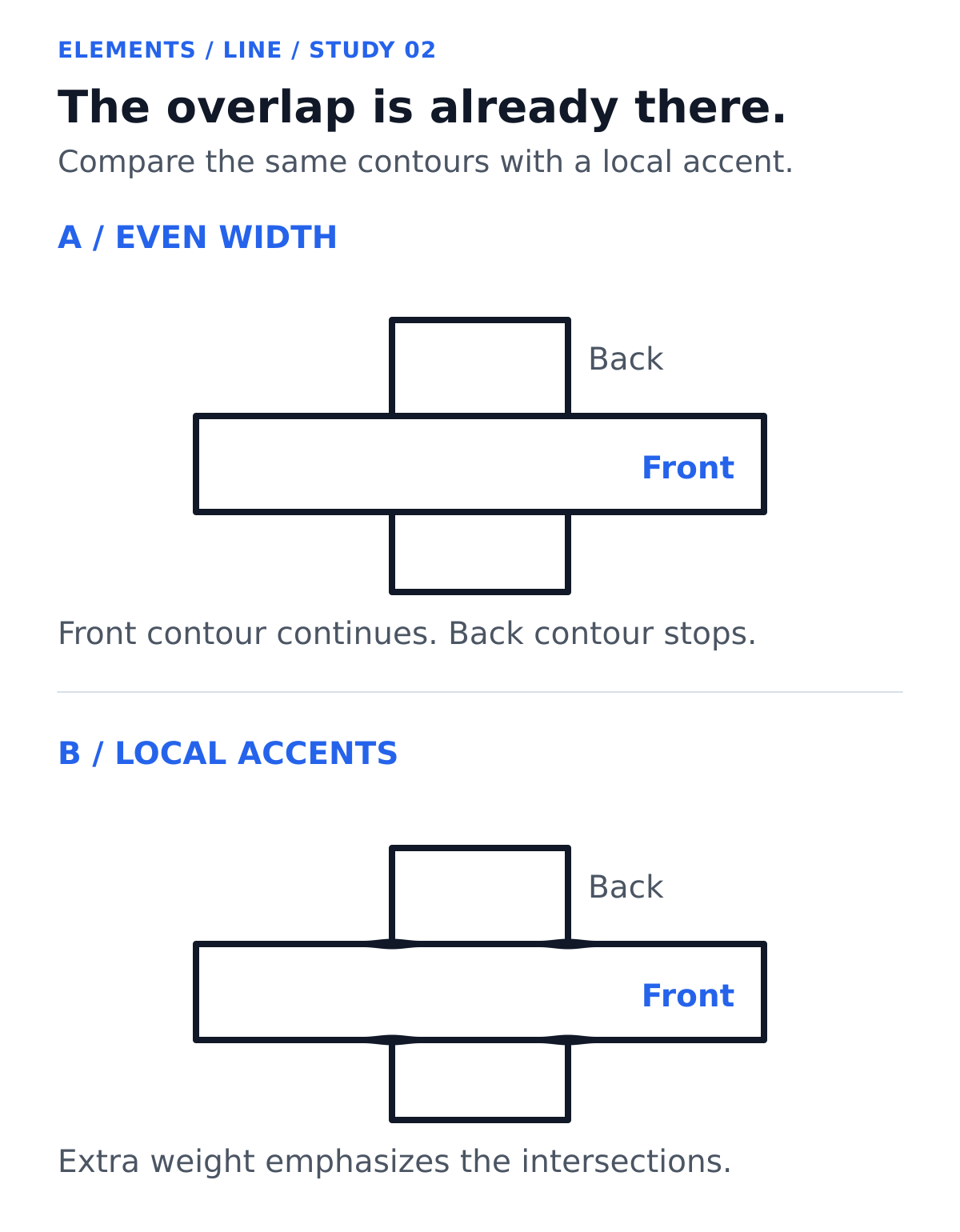
Try the same approach on a sleeve crossing a jacket. First decide which contour stays unbroken. Then add a small accent if the crossing needs it. Check the result at the size readers will see.
Save the heaviest accents for the edges you most want noticed. Finer lines on nearby creases help the outer contour stand apart from interior detail. [2]
Suggest lighting without confusing an edge with a shadow
One inking convention uses thinner contours toward an imagined light source and heavier ones away from it. Scott Drummond and Jose Fernandez both demonstrate this approach in their drawing tutorials. It is an option, not a requirement for comic art. [1, 2]
The second cylinder follows that convention, and the blue arrow marks the intended light direction. The heavier lower edge is a graphic accent, not a drawn cast shadow.
If you add a shadow on the ground, treat its shape and position separately. Hatching and solid black areas add their own light and dark relationships, and line weight can work alongside those techniques and alongside color. Continue with the Value lesson to see how light and dark organize an image.
Separate depth from emphasis
An artist may use bolder contours for nearby forms and finer ones for distant forms. Fernandez demonstrates that approach, then makes a deliberate exception: he makes the outline of a background character slightly thicker to draw attention to her. [2]
That exception matters. A heavy line does not automatically put an object closer to the viewer. Read it together with overlap, relative size, placement, and the rest of the drawing. In your own panel, decide whether an accent should clarify distance or highlight an important subject.
Distinguish width from path
Compare the three strokes below. Strokes A and B follow exactly the same curved path. A keeps a constant width; B thickens through the middle and tapers toward its ends. Stroke C keeps a constant width but follows an angular path.
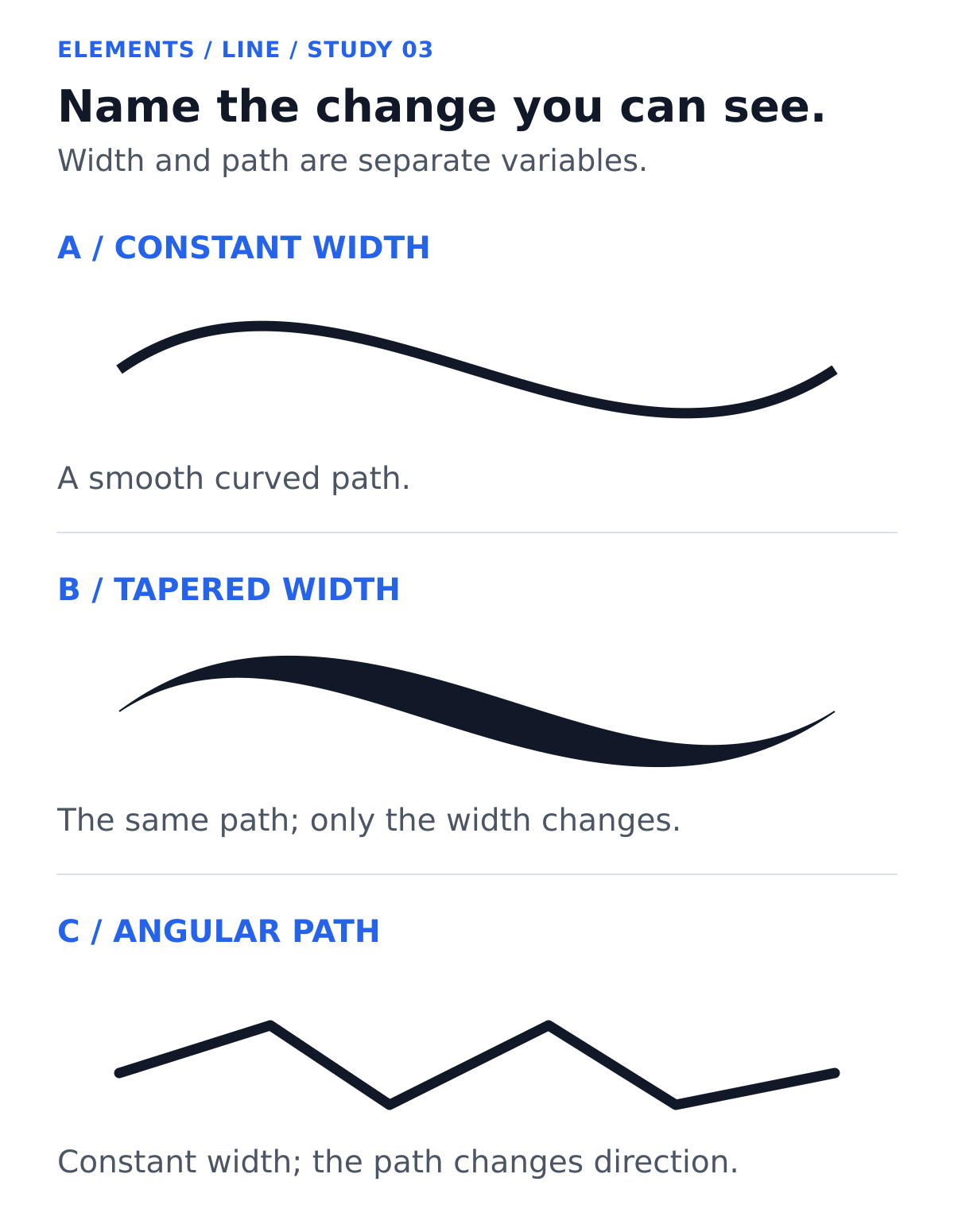
A taper is a gradual narrowing of a stroke. An angular path changes direction at corners. Texture, such as a rough edge, is a third variable; it can appear on a thick or a thin mark, and these studies do not show it. How any of these feels depends on the subject and the surrounding marks. Start with what you can see, then explain your interpretation in context. Explore the Texture lesson for more on surface character.
Try this: ink one drawing three ways
Start with a simple drawing of a cup, a shoe, or two overlapping forms. Trace it three times, keeping the contours and proportions as consistent as you can.
- Keep the width even. Use one pen size throughout. Check whether the forms and overlaps already read clearly.
- Add selective emphasis. Choose one purpose, such as clarifying an overlap, and thicken only the relevant contour sections.
- Test a lighting convention. Mark a light direction outside the drawing. Try thinner contours toward it and heavier ones away from it, and keep the paths unchanged.
You can build a thicker stroke with a second careful pass, so the exercise does not require a pressure-sensitive tool. Fernandez recommends going over lines again to get the look you want. [2] A brush or flexible nib offers another way to vary width, while multiliners produce relatively consistent widths in different pen sizes. Drummond compares these tools in his tutorial. [1]
For digital practice, check what pressure controls in your brush. Photoshop, for example, has separate pressure controls for brush size and opacity, and a stroke that becomes more opaque without widening changes a different property from the one tested here. [3]
View the three drawings at the size readers will see. Which version is easiest to follow? Which details compete with the silhouette? Where did a heavier line add useful emphasis, and where did it hide something?
Choose the version that makes the drawing easiest to read for your purpose. Keep the changes you can explain, and cut the rest.
Sources
[1] Scott Drummond, “Inking Superhero Comics in Clip Studio Paint,” Art Rocket. First-person demonstrations of traditional and digital inking tools (brush, G-Pen, multiliners), varied line weight, and one lighting convention.
[2] Jose Fernandez, “Hints on How to Improve your Line Art and Line Quality,” Art Rocket. First-person demonstrations of line weight for depth, emphasis, and lighting, including an exception to the near-bold/far-fine convention.
[3] Adobe, “Draw or paint with a graphics tablet in Photoshop”. Official documentation listing tablet pressure controls for size and for opacity as separate options. Last updated May 24, 2023.